
Software as a service or SaaS web applications are revolutionizing how businesses operate. The SaaS market could reach $1,228.87 billion by 2032. This number is indicative of the large scale integration of SaaS applications. It makes business scalable, flexible and innovative with the help of SaaS solutions. Whether you’re a business owner, tech lead, or just exploring SaaS, we’re here to assist you in making smart and growth-driven decisions.
What is SaaS (Software as a Service)
SaaS, (Software as a Service) is a cloud-based application model that is available to users through the internet instead of installing it on their computers.
With traditional software, you typically pay for licenses. Then manually install them in individual devices and manage the updates yourself. In the SaaS application model, the provider keeps everything running smoothly. This includes security, technical support, and all. It also utilizes a pay-as-you-go pricing model.
What is a SaaS Web Application?
SaaS web application is a cloud-based software that allows users to access it through the web browser without installing the application on their devices. Examples of SaaS web applications include Google Workspace, Salesforce, Slack, Zoom, and more.
Features of SaaS Web Applications
SaaS web applications aim to be both cost effective and easily accessible methods of delivering software. SaaS application development models leverage cloud technology to eliminate manual installation and reduce maintenance needs.
Cloud-Based Deployment
SaaS softwares are cloud-based, so they do not require installation on a personal device. The software can be accessed by users through a web browser. Having this cloud allows for easier access and better disaster recovery.
Subscription-Based Model
SaaS applications are a pay-as-you-go type service. The plan can be changed based on usage needs. Scale features by adding or removing them as needed without getting sticky with lengthy contracts or large upfront costs.
Multi-Tenancy
So, a multi-tenant architecture is used in SaaS development in order to serve multiple clients at a time. This eliminates the need for the provider to have the application run in more than a system.
Automatic Updates
SaaS providers automatically update SaaS applications. This guarantees that every user is on the same version of the software. You always have the most recently up-to-date version of the software with new features and security updates.
Scalability and Flexibility
When utilizing SaaS applications, businesses find it simple to modify the usage to meet their demands. These software are agile solutions, ensuring you have the resources you need.
Accessibility and Mobility
SaaS applications are accessible from any device anywhere. All you need is a reliable internet connection, that is all. And this makes it a great choice for remote works.
Benefits of SaaS Web Applications
SaaS web applications are extremely beneficial for any business since they offer improved operational efficiency and better user experience.
Cost-Efficiency
Traditional software often demands a large upfront capital investment while software as a service does not. Instead, SaaS web applications operate on a subscription based pricing model. Thus, the monthly payments are predictable. According to Business News Daily, small businesses especially benefit from the predictable costs. Also, there is no need for maintenance costs.
Easy Accessibility
SaaS applications are accessible via web browsers with internet connection. So, you can switch between devices. This is especially beneficial for remote teams, offshore projects and individuals who travel often. This remote and hybrid work model is becoming popular in today’s market. According to Harvard Business Review, such flexibility has become crucial for attracting and retaining talent in today’s workforce.
Automatic Updates and Maintenance
The provider constantly updates SaaS applications. This means that you always get the latest version of the software with the access to new features as they’re released. Which allows users to focus on their tasks rather than system maintenance.
Scalability
SaaS applications grow as the business expands. It’s easy to adjust your subscription plan to add users or more features as needed. Additionally, you could decrease your consumption to avoid unnecessary charges. This flexibility becomes a real asset for a fast-growing startup or business. Because they encounter continuous unpredictable market conditions. McKinsey & Company also supports this data.
Collaboration and Integration
Many SaaS applications integrate with other software. It enables users to avoid data silos and have an integrated and intact approach to different functions and projects. Thus, SaaS makes it easy for users to work together efficiently.
Security and Reliability
SaaS application development incorporates highly encrypted data along with secure login credentials. Also, regular monitoring by the provider keeps data safe. Moreover, SaaS providers ensure high uptime, often backed by service-level agreements (SLAs).
Types of SaaS Web Applications
SaaS applications are designed to provide unique solutions for various functions and industries.

Enterprise SaaS Applications
Enterprise SaaS applications like Salesforce (CRM software) and Enterprise Resource Planning (ERP) systems help in fulfilling large-scale business needs. These help to analyze consumer data and other prospects for managing a business.
Collaboration Tools
Collaboration tools make it easier for team members to work together — at the same office or across the globe. Such tools provide real-time communication, file storage, and online document designing.
For example, Slack – a cloud based team communication platform allows instant messaging and team discussions. For collaborative document editing, Google Workspace has tools like Google Docs and Sheets.
Finance and Accounting SaaS
Finance and accounting SaaS apps make your bookkeeping, tax preparation, and financial analysis easier. For instance, Financfy is a SaaS application for managing a business’s financial data and accounting needs. Some other popular examples are QuickBooks and Xero. These software offers financial & accounting solutions such as invoicing, expense tracking, and payroll.
Marketing and Sales SaaS
Marketing and sales SaaS apps allow businesses to connect with new audiences, nurture leads, and track the performance of marketing. HubSpot is one of many platforms that provide comprehensive marketing automation features. It is a CRM tool that helps to keep everything you need to manage your customers and campaigns in one place. Another one is Mailchimp -an email marketing tool. It enables businesses to create, automate, and analyze email campaigns.
Project Management Tools
Project management SaaS applications help teams organize the work, track progress, and meet the deadline. Tools such as Asana, Trello and Jira allow users to assign tasks, due dates, and visualize workflows. These tools offer a common ground to help teams collaborate on work and document the projects.
SaaS Web Application - Financfy
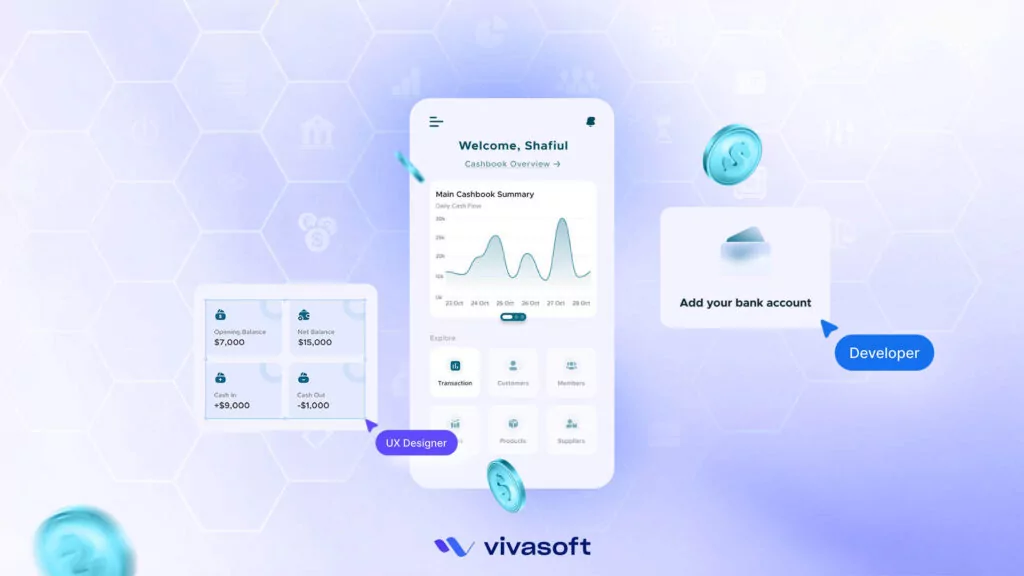
Financfy is a SaaS web application developed by Vivasoft, a company known for its innovative tech solutions. Financfy is all about making a business’s financial management simpler and more intuitive. It is a smart and user-friendly accounting software designed specifically for small to medium-sized businesses.
With Financfy, businesses can manage cash flow, track expenses, handle invoices, and keep an eye on inventory. All from one convenient platform. As it is a cloud-based accounting software, Financfy lets you check in on your finances from anywhere.
How SaaS Web Applications Work
Understanding the mechanics of SaaS web applications begins with their cloud-based structure. Here services are delivered via the internet, and processing occurs remotely. SaaS applications depend on robust infrastructure and safe handling of information to work well.
Architecture of SaaS Web Applications
Cloud infrastructure is the backbone of any SaaS application. That can be servers, databases and networking resources. These components are hosted within the data centers of cloud providers. This includes Amazon Web Services (AWS), Microsoft Azure or Google Cloud Platform (GCP).
The most common architecture type in SaaS is multi-tenant. Here, a single application responds to requests from multiple customers. And the SaaS delivery model allows the service provider to manage the complete infrastructure, updates, and security on the back end.
Security Considerations
Security is one of the most prioritized areas for SaaS applications. Data encryption is used to protect data at rest (stored inside cloud servers) and data in transit (traveling back and forth from the cloud to the user devices). Most SaaS providers use advanced encryption protocols, like SSL (Secure Sockets Layer) and TLS (Transport Layer Security). They protect data against interception and unauthorized access.
Access control is equally important and includes measures such as role-based permissions. Here, users have access only to the data and features they need. Most SaaS providers also deploy multi-factor authentication (MFA). This is to give an extra layer of verification (like a code sent to a phone) on top of passwords. At times, they must meet global data protection standards like the GDPR or the SOC 2.
API Integrations
APIs (Application Programming Interfaces) are the “connective tissue” that enable SaaS applications to interoperate with other systems. API integration which allows SaaS applications to interact with software tools, services, databases or devices. It allows sharing and transferring of data and functionalities between them.
For example, a CRM system can push data to an email marketing tool via an API. Which should assist the CRM in delivering customer data to the marketing platform automatically to create more focused campaigns.
Data Storage and Backup
With SaaS solutions, data is stored on remote servers managed by the service provider. The providers can have data as much as they want while managing the high-availability of it with fast access. The majority of SaaS providers (such as Google Drive, Apple, Dropbox, OneDrive, etc.) cut the data into many pieces. And store them at different servers and geographical locations. This reduces the possibility for data loss when it comes down to server failings or natural disasters.
Developing a SaaS Web Application
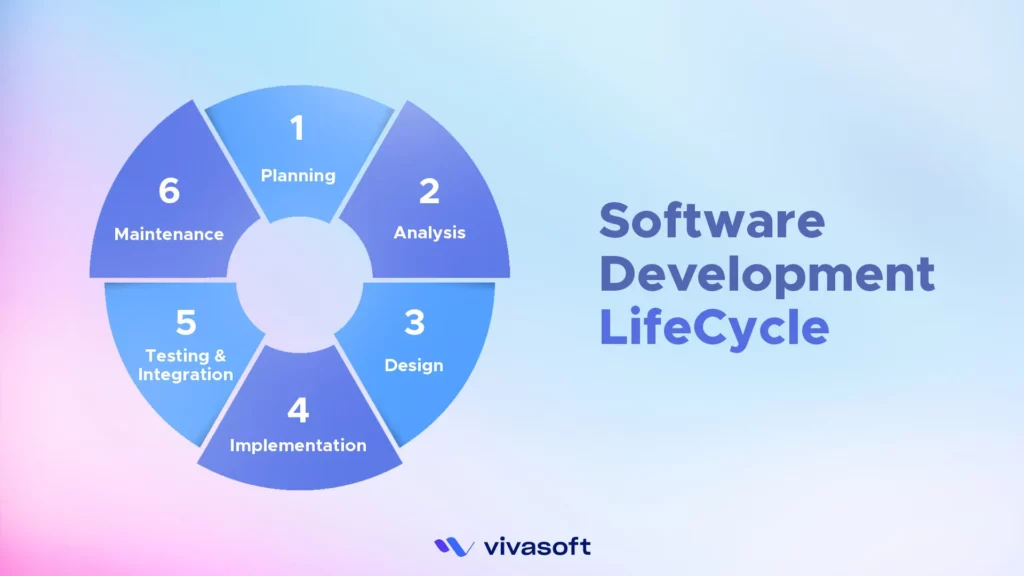
Building a SaaS web app is a balance of preparation, engineering and iteration. It needs additional care in terms of design, technology selections and safety aspects. Here’s a breakdown of how to develop the SaaS web application including steps, technology stack, challenges, and maintenance.
Steps in Building a SaaS Web Application
Creating a SaaS application is a multi-step process. This includes both strategic planning and technical implementation. They take place from ideation to deployment.
- Conceptualization and Market Research: The development process starts with a well-defined concept regarding what the SaaS application will deliver and who its target audience will be. It is a phase of deep market research to identify the impact of users and opportunities.
- UI/UX Design and Prototyping: At this stage, wireframes and prototypes will be produced. Which act as visual models of each part of the software including design, functionality, and data stream. For prototyping design tools such as Figma and Sketch are widely used.
- Software Development (Back-End and Front-End): SaaS solutions are primarily made up of two parts. The back-end that takes care of server-side logic, data management, and business processes. And the front-end, everything that the user sees and interacts with.
- Deployment and Testing: Rigorous testing to make sure the software runs under diverse conditions and devices correctly. QA and UAT address issues that need to be taken care of before the launch. Once the application passes these tests, it is uploaded to cloud hosting platforms. The platforms can be like AWS or Azure, where it is then accessible to users.
Technology Stack for SaaS Applications
The technology stack selection is quite crucial and it influences the performance, security, and scalability of the SaaS application. Some common technology sacks for the development of the SaaS application are:
- Front-End: React/Angular/Vue and other Javascript frameworks provide responsive interfaces to end-users on their devices (native-like).
- Back-End: Programming languages and frameworks implied by Node.js, Python (Django/Flask) and Ruby on Rails all provide powerful support for server-side logic and data processing operations.
- Databases: Data storage is secure and efficient if databases like PostgreSQL, MySQL and MongoDB are used.
- Cloud Hosting and Deployment: Cloud hosting providers such as AWS, Google Cloud Platform (GCP), Microsoft Azure offer all the infrastructure needed to bring SaaS applications online and to grow them.
- Containerization and Virtualization: Tools like Docker and Kubernetes help to streamline deployment as they give the user embedded environments. Thus, applications can run and facilitate features for scaling and maintenance of the applications.
Challenges in Development
There are challenges in developing a SaaS application that developers need to address proactively.
Security
User data protection is a key concern because SaaS applications keep vast amounts of sensitive data. The application must encrypt strongly, be programmed securely and have its security audited regularly.
Data Privacy
SaaS providers need to comply with data privacy regulations like GDPR or CCPA. They govern how information about users can be gathered, used and shared.
Scalability
Large user base means the application must be able to scale to support increased traffic and data. Using cloud-native architecture and scalable technologies can help to make sure the application is always responsive.
Performance Optimization
SaaS applications should deliver fast loading times and optimized performance for any device. Such actions may include optimising code and resource organisation to reduce lag time.
Ongoing Maintenance and Improvement
Once the application is live, continued upkeep of the application needs to happen to ensure that it is current and stable. This includes:
- Monitoring and Troubleshooting: Provides performance or error details enabling real-time resolution.
- Iterative Updates: To remain competitive, SaaS providers frequently update the app with new feature enhancements and security fixes.
- User Feedback and Enhancement: When developing SaaS apps, collecting user feedback helps perfect them. This allows developers to give priority to new features and enhancements that line up with the need for users.
SaaS Web Application Security Best Practices
It is common for SaaS web apps to deal with sensitive and personal information. End-end encryption safeguards the app feature as well as the trust the user can put in the service.
Data Protection and Encryption
Data encryption is one of the most basic practices for SaaS application security. For data-in-transit, encryption protocols such as TLS (Transport Layer Security) are crucial. Data exchanged between parties is encrypted using TLS. Encryption standards like AES-256 similarly deter access to stored data without authorization.
User Authentication and Authorization
To enhance security at the login layer, many SaaS applications enforce multi factor authentication (MFA) and single sign-on (SSO). In this, MFA requires users to confirm their identity with two or more verification methods.
With SSO, users only need one set of credentials to log into multiple applications. The approach is seen in suites such as Google Workspace or Microsoft 365. It helps prevent password fatigue while still practicing secure password usage.
Compliance with Regulations
Compliance with regulations such as GDPR in the EU, CCPA in California, and HIPAA in the U.S. is mandatory for SaaS providers. GDPR has strict standards on data privacy. It requires companies to be transparent about data collection and usage. It also grants individuals rights in regard to their data, including the right to request its deletion.
CCPA is similar, but applies to California residents’ data rights. HIPAA, regulated by healthcare, outlines stringent criteria in the management of medical information.
Monitoring and Auditing
Regular monitoring allows for easier detection of abnormal or potentially malicious activity in real time. Some providers even employ artificial intelligence to analyze activity patterns and detect anomalies.
Audits, however, consist of regular assessments of the system’s security measures. It keeps the system lithe against different and evolved threats. An end-to-end audit may check everything from encryption practices to access control measures.
Choosing the Right SaaS Web Application for Your Business
Selecting the right SaaS web application is essential to address key business challenges. But every business is unique, with different needs and goals. So, getting that fit is a little more complicated. The following are crucial points to focus on while selecting a SaaS application.
Evaluating Your Business Needs
Begin With an Audit of Your Company Functions. Find pain points that can either be improved or addressed via a SaaS solution. Consider questions like: What do we do from day to day? Where are the bottlenecks? What general objectives are we trying to fulfil?
For instance, if your team is heavy on projects then you may consider something like Asana or Trello. Meanwhile, operations aligned to accounts might prefer answers such as Financfy or QuickBooks.
Assessing Features and Integrations
Features should align with your plan to grow. Find applications that provide essential capabilities such as reporting, automation, and safe data management. You also need integrations. Your SaaS app should be able to seamlessly connect with other business software and tools your team already uses.
Pricing Plans and Cost Efficiency
SaaS platforms are typically less expensive than traditional software. But it’s always important to evaluate pricing structures in detail. Most tools have multiple tiers and/or a free trial, so you can test before you commit. Look at factors of total cost of ownership. There may be additional costs to consider such as for add-ons, scaling, and support. Select a software that grows with you to avoid expensive migrations.
User Experience and Support
Evaluation of usability and support is crucial. Because they directly impact how well your team can adopt and benefit from the software. Look for platforms that offer an intuitive user experience, clear documentation, and robust customer service options. Vibrant community support such as online forums or user groups is another useful place to find helpful tips and troubleshooting solutions. A tool that’s easy to use with responsive support minimizes downtime.
Security and Compliance
Security is a non-negotiable factor when choosing a SaaS application. Especially if your business is responsible for highly sensitive data. Choose service providers where data encryption is at the forefront of their offerings. They should implement multi-factor authentication in addition to routine security audits. Some industries have special regulatory requirements, such as healthcare or finance. For this, make sure that the solution complies with relevant regulations like GDPR, HIPAA, or SOC 2.
Scalability and Customization Options
Your software needs will change as your business expands. Select a SaaS that can grow with you. It should be able to accommodate more users, additional features, or greater storage without a painful migration. Also, look for customization options to tailor workflows, adjust interfaces, and set unique permissions to meet your needs.
Performance and Reliability
Examine the platform’s performance, uptime record, and service level agreements (SLAs). A platform with high reliability minimizes unexpected disruptions. Look for user testimonials and support resources as well. They can provide insight into the quality of the provider’s performance. Also, you will get to know how well they handle their issues and so on.
Final Thoughts
Clearly, SaaS web applications are changing business processes in amazing ways. They provide accessible, scalable, and cost-efficient tools that streamline business operations and drive growth. SaaS solutions enable businesses to stay competitive, adapt quickly, and innovate. These solutions save you from heavy infrastructure investments.
As digital transformation accelerates, SaaS applications continue to grow in importance. They empower organizations of all sizes to respond flexibly to market demands. Choosing the right SaaS application development companies is more than a technology decision. It’s a strategic investment in a business’s future agility and resilience. Adopting SaaS today means preparing for a digital-first future.